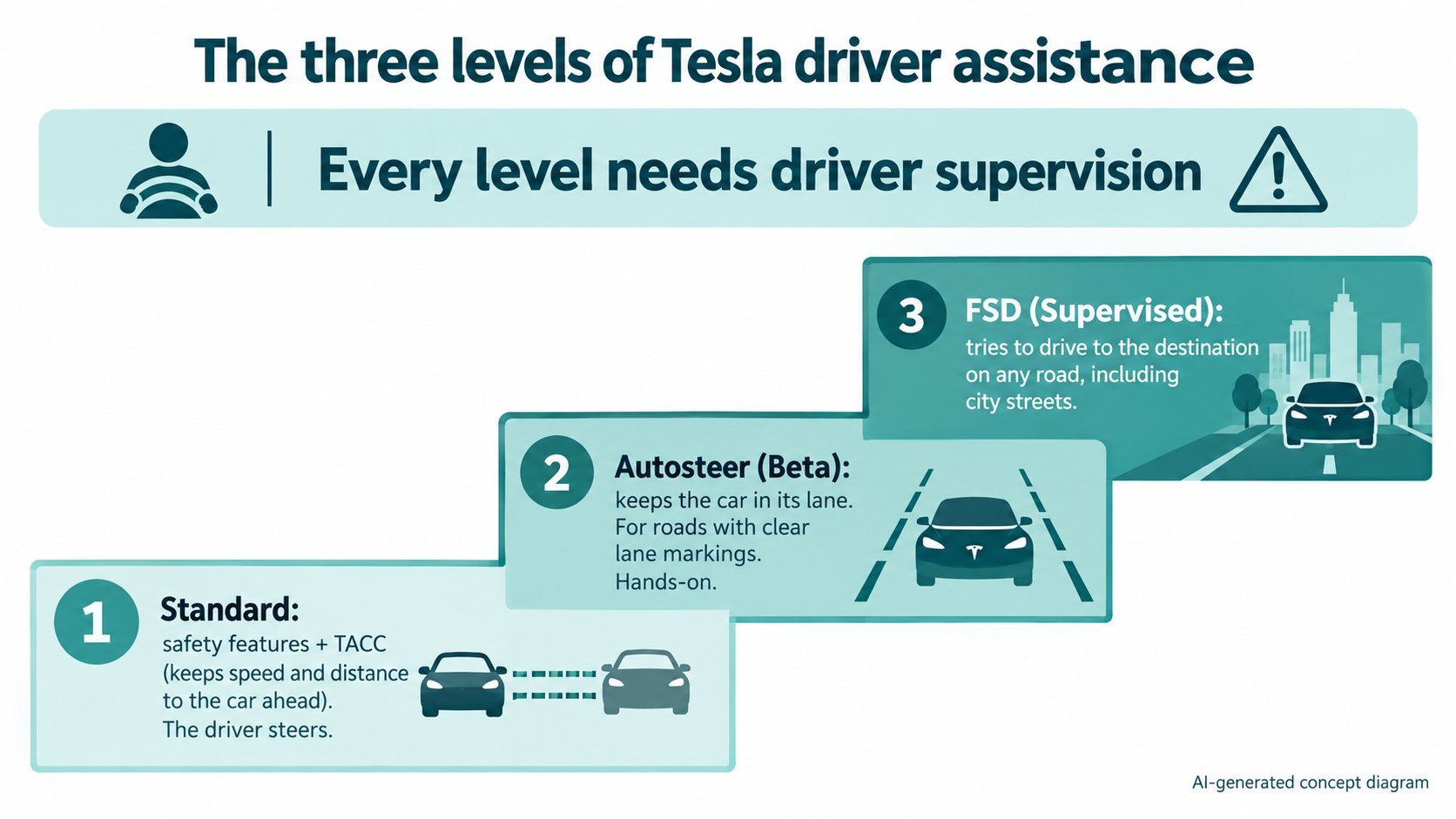
In Tesla's official owner's manual (Model 3, North America, software 2026.32), driver assistance is described in levels: (1) Traffic-Aware Cruise Control, standard on every car, keeps speed and distance to the car ahead; (2) Autosteer keeps the car in its lane, for roads with clear lane markings; (3) Full Self-Driving (Supervised) is meant for any type of road, including city streets. We found no product called "Autopilot" on the current official pages we read. At every level, the driver must watch the road and be ready to take over.
What is the difference between FSD and Autopilot? This is a question you see often in search. In the previous article on Tesla Vision, we confirmed that the driver assistance uses cameras. Here we sort out, from Tesla's official descriptions, what levels that driver assistance is divided into.
The conclusion: three levels, but we found no "Autopilot" name on the current official pages
"About Self-Driving" in Tesla's official owner's manual (Model 3, North America, software 2026.32) describes driver assistance as follows:
| Level | Feature | Official description (summary) |
|---|---|---|
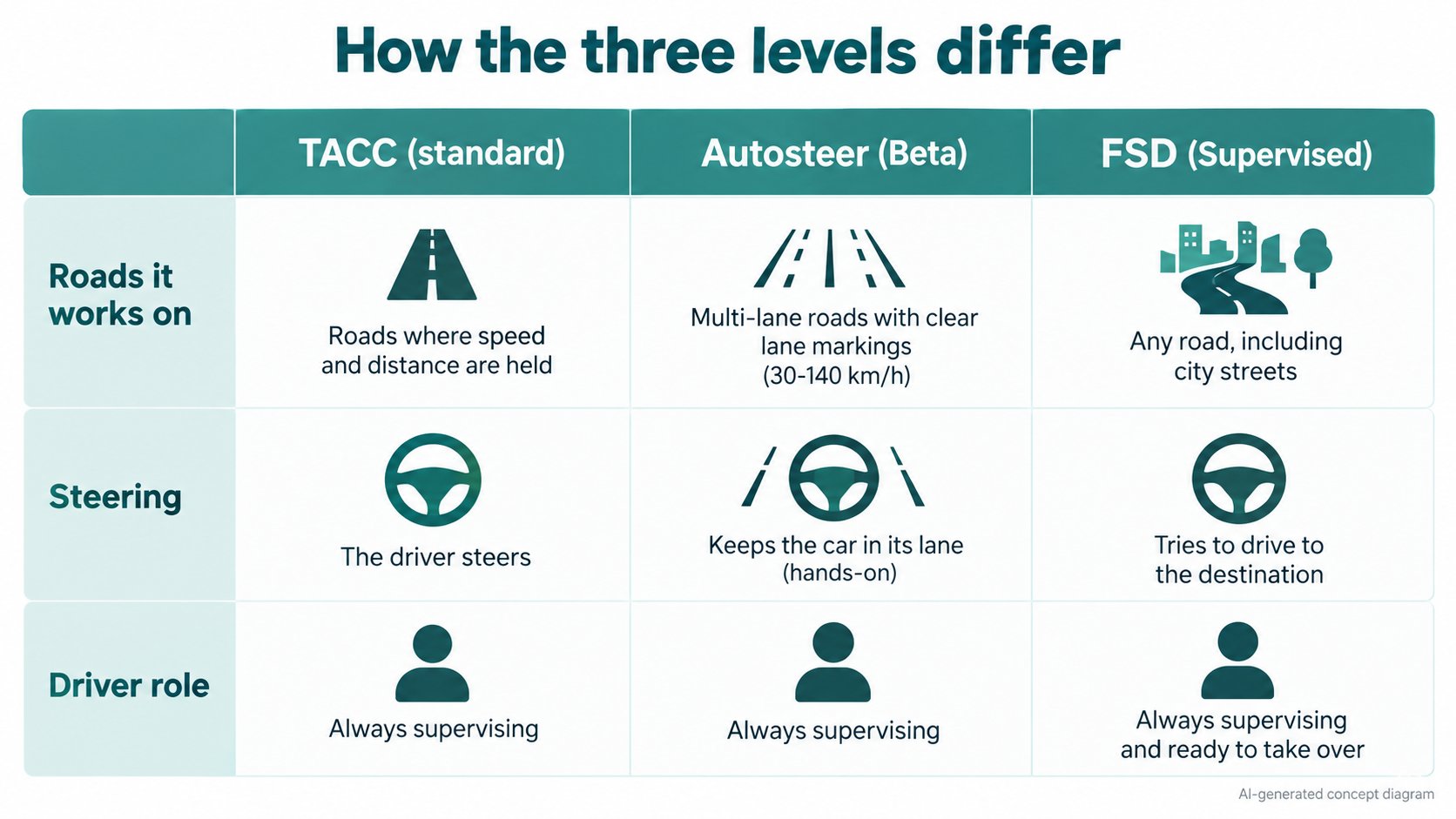
| 1. Standard | Safety features + Traffic-Aware Cruise Control (TACC) | On every car. TACC maintains a set speed and a following distance. The driver steers. |
| 2. Autosteer | Autosteer (Beta), Auto Lane Change, Navigate on Autosteer | In addition to TACC, it steers to keep the car in its lane. For multi-lane roads with clear lane markings. |
| 3. FSD | Full Self-Driving (Supervised) | Attempts to drive to a destination on any type of road, including city streets, handling intersections, stop signs, roundabouts, turns and highway entry/exit. |
At every level, the official text carries the same caution:
"None of these features make Model 3 fully autonomous or replace you as the driver." (paraphrased from About Self-Driving in the manual)
So at every level, the driver is responsible for driving. Even FSD, despite the name "Full Self-Driving", has the official name (Supervised).
[What we confirmed about "Autopilot"]
Opening Tesla's support page "Autopilot" (`tesla.com/support/autopilot`) took us to "Active Safety Features and Traffic-Aware Cruise Control". The name "Autopilot" also does not appear in the manual's "About Self-Driving". So "Autopilot" looks like an earlier name (this is the author's guess). What exactly "Autopilot" included, and when the name changed, we did not confirm.
1. Standard: safety features and Traffic-Aware Cruise Control
According to Tesla's support page (Active Safety Features and TACC), these come standard on every Tesla:
| Feature | Official description (summary) |
|---|---|
| Automatic Emergency Braking | Detects cars or obstacles the vehicle may hit and applies the brakes |
| Forward Collision Warning | Warns of impending collisions with slower or stationary vehicles ahead |
| Side Collision Warning | Warns of potential collisions with obstacles alongside |
| Obstacle Aware Acceleration | Reduces acceleration when an obstacle is detected ahead at low speed |
| Blind Spot Monitoring | Warns when a vehicle is in the blind spot when changing lanes |
| Lane Departure Avoidance | Applies corrective steering to keep the car in its lane |
| Emergency Lane Departure Avoidance | Steers back into the lane when leaving it could cause a collision |
Traffic-Aware Cruise Control (TACC), on top of ordinary cruise control (holding a set speed), speeds up and slows down automatically to keep the following distance to the car ahead. Even with TACC on, the page says "you are still responsible for steering".
2. Autosteer: staying in the lane
According to the "Autosteer" page of the manual:
- Like TACC, Autosteer maintains a set speed or following distance. In addition, it detects lane markings, road edges, and vehicles and objects to keep the car in its driving lane.
- It is labeled a BETA feature.
- It is available between 18 mph (30 km/h) and 85 mph (140 km/h).
- Auto Lane Change: with Autosteer active, engaging the turn signal moves the car into the adjacent lane (when safe conditions are met).
- Navigate on Autosteer: changes lanes and heads to exits to follow the navigation route. Also beta.
- If the speed limit cannot be detected, it limits the set cruising speed to 45 mph (70 km/h).
- It is explicitly a hands-on feature: keep your hands on the steering wheel.
[A note for beginners]
"Hands-on" means keeping your hands on the wheel. Light force is enough; the car checks for your hands by slight resistance when the wheel turns and similar cues (from the manual).
3. FSD (Supervised): trying to drive to the destination on any road
According to the "Full Self-Driving (Supervised)" page:
- To reach a destination, it follows curves, handles intersections, stop signs and roundabouts, makes left and right turns, and enters/exits highways.
- TACC, Autosteer and Navigate on Autosteer are meant for "multi-lane roadways with clear lane markings". FSD (Supervised) is "meant to work in a variety of driving scenarios" and can be used on any type of roadway, including residential and city streets.
- The car starts its own lane changes; unlike Navigate on Autosteer, it does not ask for confirmation each time.
- It can be engaged at any speed under 85 mph (140 km/h), including from a standstill.
- Speed is set with five profiles: Sloth / Chill / Standard / Hurry / Mad Max (Sloth drives at or below the speed limit; Mad Max drives faster than Hurry with more lane changes).
- When FSD (Supervised) is enabled, TACC and Autosteer are unavailable (a note in the manual).
At every level, the driver is the "watcher"
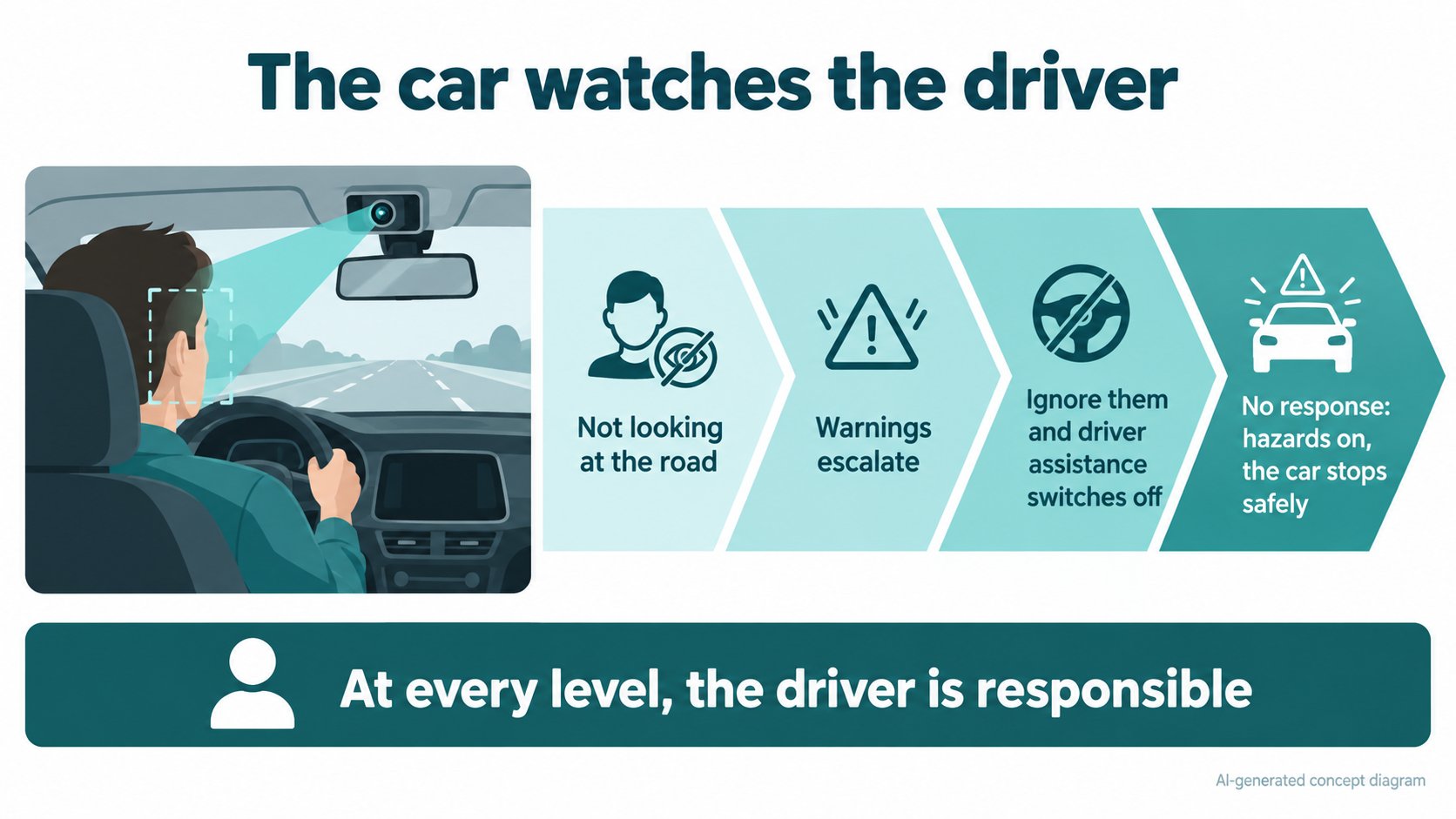
The manual also describes how the car checks that the driver keeps paying attention:
- The cabin camera above the rear view mirror monitors the driver. This system cannot be disabled, and it still works if the driver wears sunglasses.
- If the driver repeatedly looks away, warnings escalate. If they are ignored, that driver assistance is disabled for the rest of the drive.
- If the driver still does not respond, the car sounds a continuous chime, turns on the warning flashers and safely stops.
- When driver-assistance disengages for inattentiveness, that is a "strikeout"; five strikeouts suspend use for a week (the manual; the support page says three or five depending on the vehicle). A strikeout is forgiven after half a week (3.5 days).
- Using devices designed to circumvent the attentiveness checks can lead to the feature being permanently disabled.
Price (as shown on Tesla's US page)
When we read Tesla's US support page for FSD on 2026-10-16, it said:
- FSD (Supervised) is a subscription at US$99 per month.
- It says FSD (Supervised) is "not available for outright purchase", only as a subscription.
- The program for transferring a previously purchased FSD to another vehicle ended on March 31, 2026.
[What we could not confirm in this article]
This is what the US page shows. We did not check availability, price or features in Japan or elsewhere. The page also says price and feature availability are subject to change. Before buying or subscribing, always check the latest official page.
The safety figures Tesla states
The FSD support page says that Tesla vehicles with FSD (Supervised) engaged experience 7x fewer major and minor collisions and 5x fewer off-highway collisions than those driven without (citing the "Vehicle Safety Report").
[What we could not confirm in this article]
These are Tesla's own claims. We did not check the original Vehicle Safety Report or how the comparison was made (what kinds of cars, under what conditions). We only report that "Tesla states this".
FAQ
Are FSD and Autopilot the same thing?
On the current official owner's manual and support pages we read, we found no product named "Autopilot". The features are now described as "Traffic-Aware Cruise Control", "Autosteer", "Full Self-Driving (Supervised)" and so on. We could not confirm how these map to the earlier name.
If I use FSD, do I not need to drive?
No. The official text says it does not replace the driver, and the driver must always watch the road and be ready to take over.
On which roads can FSD be used?
The manual says "any type of roadway, including residential and city streets". It also says driver intervention may be needed in situations such as narrow roads with oncoming cars, construction zones and complex intersections.
Can FSD be used in Japan?
We did not confirm this. We did not read the Japanese edition of the manual or Tesla's Japanese pages.
Summary
- Tesla's driver assistance is described in three levels: standard (safety features + TACC) → Autosteer → FSD (Supervised).
- Autosteer keeps the car in its lane (beta, 30-140 km/h, hands-on). FSD tries to drive to the destination, including on city streets.
- The name "Autopilot" was not found on the current official pages (it looks like an earlier name; the author's guess).
- At every level, the driver is responsible, and the cabin camera watches.
- The US price (US$99/month), the safety figures (fewer collisions) and availability in Japan are unconfirmed or Tesla's own claims.
Next article: the difference between LFP and NMC batteries, and how to think about choosing.
Sources (checked 2026-10-16)
- Tesla, "Model 3 Owner's Manual", About Self-Driving (North America, software 2026.32): https://www.tesla.com/ownersmanual/model3/en_us/GUID-101D1BF5-52D2-469A-A57D-E7230BBEE94B.html
- Tesla, "Model 3 Owner's Manual", Autosteer: https://www.tesla.com/ownersmanual/model3/en_us/GUID-20F2262F-CDF6-408E-A752-2AD9B0CC2FD6.html
- Tesla, "Model 3 Owner's Manual", Full Self-Driving (Supervised): https://www.tesla.com/ownersmanual/model3/en_us/GUID-2CB60804-9CEA-4F4B-8B04-09B991368DC5.html
- Tesla Support, "Full Self-Driving (Supervised)": https://www.tesla.com/support/fsd
- Tesla Support, "Active Safety Features and Traffic-Aware Cruise Control": https://www.tesla.com/support/active-safety-tacc
This article is for learning about science and technology and is not investment advice. Driver-assistance features assume an attentive driver. Facts and the author's reading are kept separate. The figures are AI-generated illustrations.
Thank you for reading. Was this article useful to you?
Thank you. If you like, tell us what you thought in a line or two.
Optional. No name or email needed.
Received. We will use your words to make better articles.