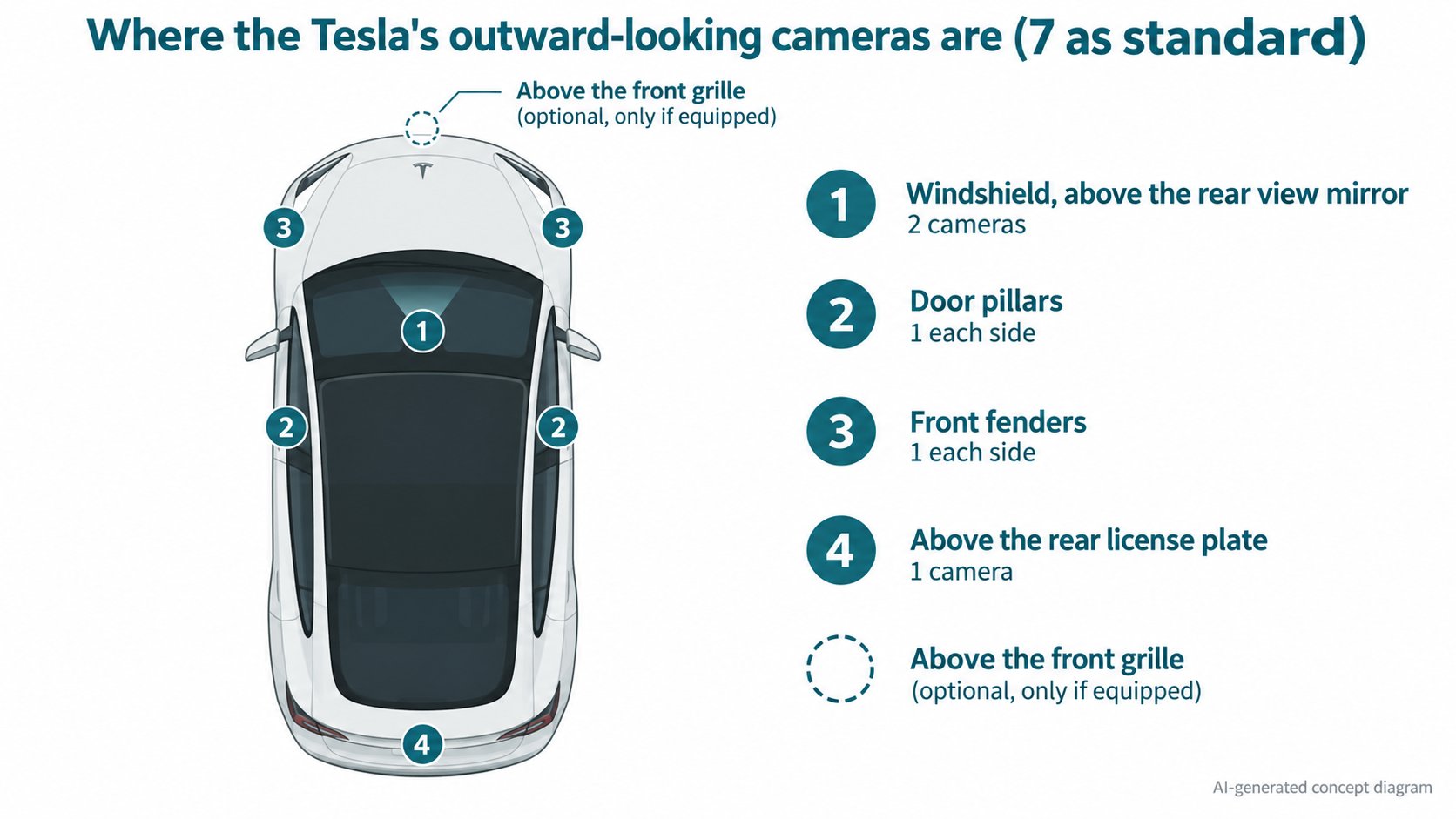
Tesla's official owner's manual (Model 3, 2024+, software 2026.32) says its Self-Driving features use camera images from the front, rear, left and right of the car. Two cameras sit on the windshield above the mirror, one in each door pillar, one on each front fender and one above the rear license plate: seven in total by our count, plus an optional one above the front grille. Press reports say Tesla dropped radar around May 2021, but we could not read the original Tesla support page.
In the previous article, the Cybertruck's 48 V battery, we talked about the car's electricity. This one is about the car's eyes. Tesla's driver assistance is said to rely mainly on camera images. That idea is called Tesla Vision. Let's check what the official owner's manual actually says.
The conclusion: Tesla's driver assistance uses images from several cameras
Tesla's official owner's manual (Model 3, 2024+, software 2026.32) says, in summary:
- The Self-Driving features use cameras, mounted on the front, rear, left and right of the car.
- There is also a cabin camera (above the rear view mirror) that checks whether the driver is paying attention.
The "Cameras" page lists the locations:
| Location | Number |
|---|---|
| Windshield, above the rear view mirror | 2 |
| Left and right door pillars | 1 each (2) |
| Left and right front fenders | 1 each (2) |
| Above the rear license plate | 1 |
| Above the grille on the front bumper | 1, only if equipped |
| Cabin (above the rear view mirror) | 1 (watches driver attentiveness) |
That makes seven outward-looking cameras as standard (the author's count: 2+2+2+1), or eight with the optional front-bumper camera.
[What we could not confirm in this article]
The manual does not give each camera's resolution, field of view, or division of roles (which camera looks how far). We also did not check the camera count on other models such as the Model Y or Cybertruck.
What does the car do with the images?
The manual's "Full Self-Driving (Supervised)" page says:
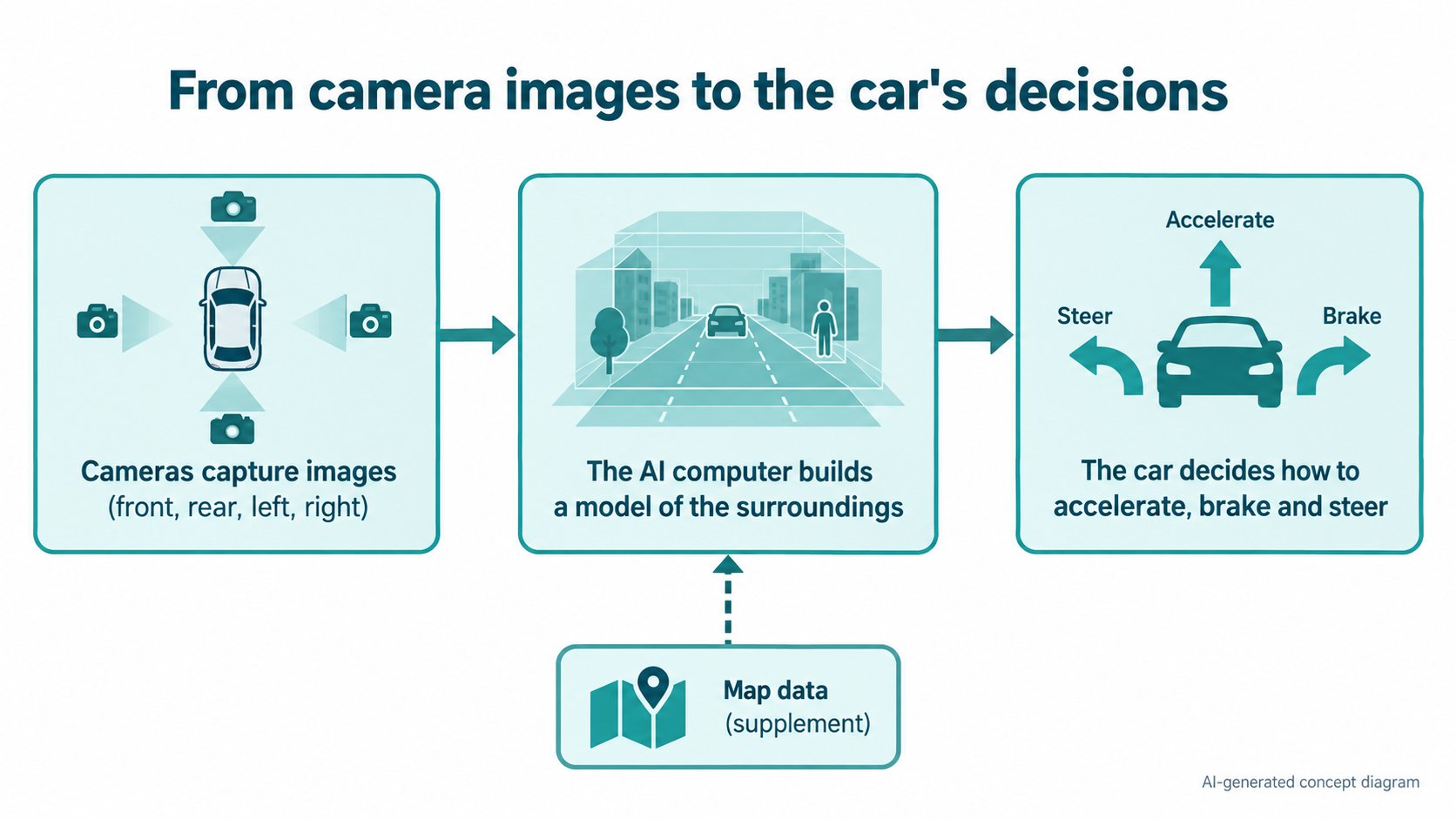
- It uses input from the front, rear, left and right cameras to build a model of the area around the car.
- The car's AI computer is designed to use that input, process neural networks rapidly, and make decisions.
- The screen shows roads, vehicles, pedestrians, curbs, bicycles and more. But the display may not represent everything the system considers; the manual says some camera data may not appear on the screen.
- It "primarily uses visual data" from the cameras, and says greater accuracy is achieved with the most recent map data.
So rather than "cameras only", it reads as centered on camera images, with maps as a supplement (this is the author's reading of the manual).
[A note for beginners]
A neural network is a mechanism that finds patterns from many examples. For instance, from photos it learns to tell "this shape is a stop sign" or "this line is a lane marking". We plan to cover it in a separate article.
Calibration is required
Even a small change in a camera's mounting angle changes how distance looks. So the manual describes a process in which the cameras calibrate themselves while driving:
- Before some features (such as Lane Departure Avoidance and Automatic Emergency Braking) can be used for the first time, or after some repairs, the cameras must complete self-calibration.
- The touchscreen shows a progress indicator.
- Calibration typically completes after driving 32-40 km (checked in the Hong Kong edition, in metric units; it varies with road and conditions).
- It finishes faster on a straight, multi-lane road with clearly visible lane markings; the middle lane of a multi-lane highway is recommended.
- Contact Tesla only if calibration has not completed after 160 km in those conditions.
- If a camera has shifted (for example, the camera or windshield was replaced), you clear the calibration from the screen (Clear Calibration) and it starts again.
- Calibration is repeated after Tesla services the cameras and, in some cases, after a software update.
What cameras are bad at: dirt, rain and condensation
Because the system depends on images, a situation where the cameras cannot see is directly a weakness. The manual warns:
- Before each drive, make sure all cameras are clean and unobstructed.
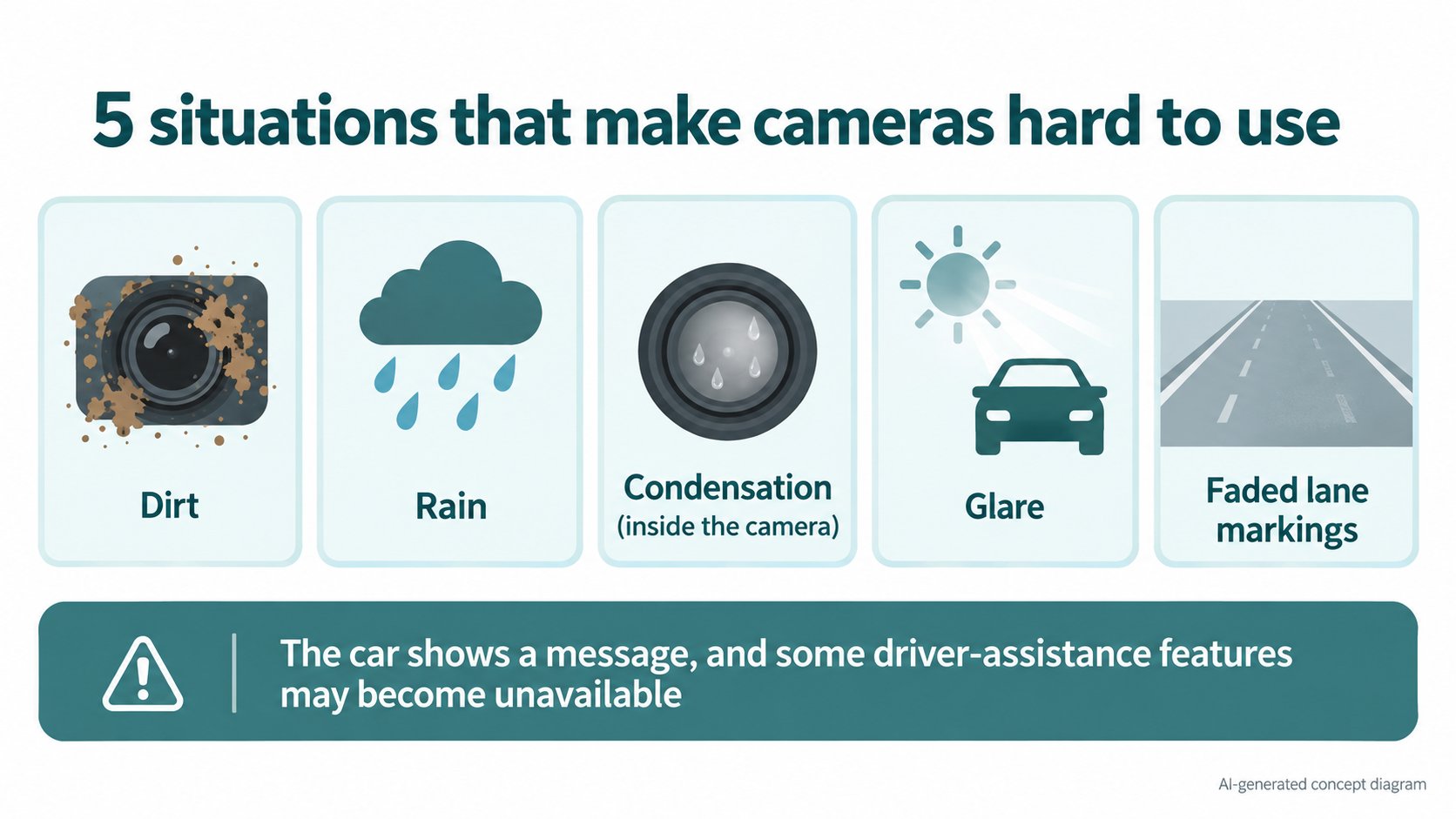
- Dirty cameras, rain and faded lane markings can affect performance.
- If a camera is obstructed or blinded, a message appears and Self-Driving features may not be available.
- When parked outside in cold or wet weather, condensation can form inside the camera enclosures. The car then warns that a camera is blocked and may restrict some or all Self-Driving features temporarily. To dry it faster, precondition the cabin warm, turn on the defroster and aim the front vents at the door pillars.
- A summary of poor camera visibility on your last drive is under "Controls > Service > Camera Visibility".
- Images showing poor visibility do not leave the vehicle unless your Data Sharing preferences allow it, and are deleted automatically after two days, the manual says.
How radar was phased out (press reports)
Earlier Teslas also had radar (a device that measures the distance to the car ahead using radio waves). According to press reports, from deliveries in May 2021, Tesla stopped fitting radar to Model 3 and Model Y for the US and Canada, switching to driver assistance centered on camera images (Tesla Vision). Tesla was reported to say that one reason was that "Model 3 and Model Y are our higher volume vehicles". It was also reported that some features would be "temporarily limited or inactive" right after the change and restored by later software updates.
[What we could not confirm in this article]
This history comes from press coverage (Drive Tesla Canada and others). We could not read the original Tesla support page ("Transitioning to Tesla Vision"); it now redirects to another page. We did not confirm the exact date, the models affected, or the list of limited features from the original. We also did not check whether a current car has radar.
Why cameras? (the author's reading)
[The author's reading, not a confirmed fact]
Humans drive mainly by sight. Signs, signals and lane markings are all made to be seen by human eyes. So the idea that "if a system can judge from camera images the way people do, it matches how roads are designed" is easy to understand. But we could not confirm that Tesla explains it this way, nor which is safer: this approach or one that adds other sensors such as radar. We leave this as an open question rather than a conclusion.
FAQ
What is Tesla Vision?
In this article, it is the name for Tesla's approach in which driver assistance centers on camera images. We could not read an official definition of the name itself. What we did confirm in the manual is that the Self-Driving features use cameras.
How many cameras does a Tesla have?
In the Model 3 manual, there are seven outward-looking cameras by our count: two on the windshield, two in the door pillars, two on the front fenders and one at the rear. The one above the front grille is only on cars equipped with it. There is also a cabin camera.
What happens when a camera gets dirty?
A message appears and some driver-assistance features may become unavailable. The manual says to make sure the cameras are clean before each drive.
Are camera images sent to Tesla?
The manual says images showing poor visibility do not leave the vehicle unless your Data Sharing preferences allow it. You can check the setting under "Controls > Software > Data Sharing". We did not check the details of the setting or how other data is handled.
Summary
- According to Tesla's official owner's manual, the driver assistance uses camera images: seven outward-looking cameras as standard (our count) plus one cabin camera.
- The car builds a "model" of its surroundings from camera input and decides with an AI computer. Maps help as a supplement.
- Self-calibration (typically 32-40 km) is needed before use.
- Dirt, rain and condensation can make features unavailable.
- The radar phase-out is from press reports. The original Tesla page, camera performance figures and other models' setups are unconfirmed.
Next article: what is the difference between Tesla's "FSD" and "Autopilot"? We sort it out from Tesla's official descriptions.
Sources (checked 2026-10-16)
- Tesla, "Model 3 Owner's Manual", Cameras (Hong Kong edition; the same topic appears in the regional editions for software 2026.32): https://www.tesla.com/ownersmanual/model3/en_hk/GUID-682FF4A7-D083-4C95-925A-5EE3752F4865.html
- Tesla, "Model 3 Owner's Manual", About Self-Driving (North America, software 2026.32): https://www.tesla.com/ownersmanual/model3/en_us/GUID-101D1BF5-52D2-469A-A57D-E7230BBEE94B.html
- Tesla, "Model 3 Owner's Manual", Full Self-Driving (Supervised) (North America): https://www.tesla.com/ownersmanual/model3/en_us/GUID-2CB60804-9CEA-4F4B-8B04-09B991368DC5.html
- Drive Tesla Canada, "Tesla confirms removal of radar from recent Model 3/Y builds in switch to 'Tesla Vision'" (2021, press report; only the quoted parts of Tesla's page were checked): https://driveteslacanada.ca/model-3/tesla-confirms-removal-of-radar-from-recent-model-3-y-builds-in-switch-to-tesla-vision/
This article is for learning about science and technology and is not investment advice. Driver-assistance features assume an attentive driver. Facts and the author's reading are kept separate. The figures are AI-generated illustrations.
Thank you for reading. Was this article useful to you?
Thank you. If you like, tell us what you thought in a line or two.
Optional. No name or email needed.
Received. We will use your words to make better articles.