According to the Model 3 owner's manual (2026.32), Park Assist alerts you to nearby objects when driving slowly, such as when parking: in front when in Drive, behind when in Reverse. The North American edition says cameras around the car build a picture of surrounding objects on the touchscreen (red is closer, yellow is farther), and with chimes on, a beep sounds as you approach. It may miss children, pedestrians, animals, moving objects, low curbs (under about 20 cm) and thin posts, and the manual says always to check with your own eyes.
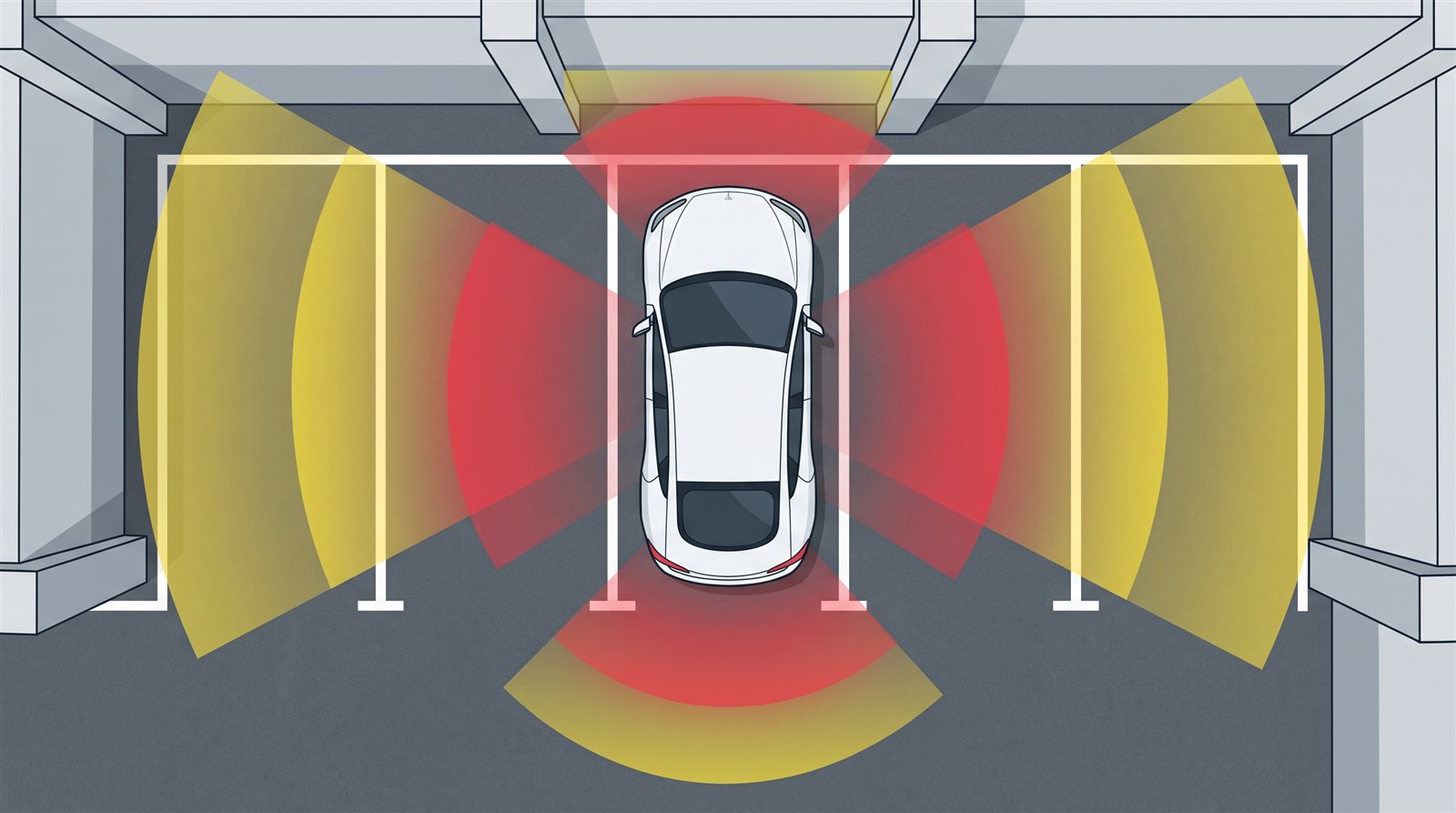
When parking, the front and rear of a car are hard to see from the driver's seat. Tesla's Park Assist shows nearby objects on the screen and warns you with sound while you drive slowly. This article checks what it can and cannot see in the Model 3 owner's manual (North American and Japanese editions, software 2026.32).
In short: it shows nearby objects in color and beeps, but it misses many things and you must not rely on it
- At low speed (such as when parking), it alerts you to nearby objects: in front when in Drive, behind when in Reverse.
- The North American edition says the cameras at the front, rear and sides create a picture of surrounding objects on the touchscreen (Tesla Vision Park Assist). Red is closer, yellow is farther.
- With chimes on, a beep sounds as you approach an object.
- The manual's warning: "Never depend on Park Assist. Always inspect the area with your own eyes. When reversing, perform shoulder checks and use all mirrors."
Screen and sound
| Situation | What happens |
|---|---|
| Shift to Reverse | The Park Assist view appears, showing objects close to the front and rear |
| Shift to Drive | The view closes, unless an object is close in front; then it closes once you drive faster than Park Assist operates |
| Camera app open, driving slowly | A button at the upper left switches to the Park Assist view (useful for parallel parking, the manual says) |
| To close it | Touch the X |
| If it cannot work | The screen shows an alert message |
Chime setting
Controls > Safety > Park Assist Chimes turns the sound on or off. You can use it without sound.
What it can miss or get wrong
The manual says it may not work correctly in these situations:
- Low objects (below about 8 inches / 20 cm, such as a curb or low barrier). They can move into a blind spot, and the car can no longer alert you.
- Thin objects (such as a sign post).
- Sound-absorbing or soft objects (such as powder snow).
- Sloped objects (such as a sloped embankment).
- Heavy rain, snow or fog, and extremely hot or cold temperatures.
- Objects too close to the bumper, or a misaligned or damaged bumper.
- Things mounted on the car (a bike rack, a bumper sticker) that interfere.
- The car rolling freely the opposite way from the gear selected (for example, rolling backwards downhill in Drive). No alert is shown.
The warning also says Park Assist does not detect children, pedestrians, bicyclists, animals, moving or protruding objects, or objects too close, too far, or too far above or below the cameras.
Camera care is covered too: keep the cameras free of dirt, snow and ice; do not use a high-pressure washer; do not clean with sharp or abrasive objects; and do not put accessories or stickers on or near the cameras.
A note only in the Japanese edition
The Japanese edition begins by saying this feature may be temporarily limited or disabled on cars made from about September 2023 until it is enabled by a future software update. It also describes detection with "several sensors", while the North American edition says "cameras". So the two editions describe the detection method differently.
[Author's reading (not a confirmed fact)]
Because low, thin and sound-absorbing objects are hard to detect, the method appears to depend on the shape and material of objects. But how it actually detects cannot be known from the manual's text.
FAQ
With Park Assist, can I skip checking with my eyes?
No. The manual warns not to rely on it and always to check with your own eyes.
Does it react to curbs?
Objects below about 20 cm may not be handled correctly, and can move into a blind spot where no alert is given (manual).
Can I turn the sound off?
Yes. Controls > Safety > Park Assist Chimes (manual).
Does it detect children or animals?
The manual says it does not detect children, pedestrians, bicyclists or animals.
How do I close the view?
Touch the X on the screen (manual).
Summary
- Park Assist shows nearby objects in color (red closer, yellow farther) and beeps while you drive slowly.
- It can miss low curbs, thin posts, people, animals and moving objects. The manual warns: check with your own eyes.
- Sound is set in Safety settings. Keep the cameras clean and do not use a high-pressure washer.
Related articles: Summon and Autopark, Pedestrian Warning System, Lane Assist, Cabin Camera and Cabin Radar.
Next article: coming soon.
Sources (checked 2026-10-18)
- Tesla, "Model 3 Owner's Manual (2024+, software 2026.32, North America)", Park Assist: https://www.tesla.com/ownersmanual/model3/en_us/GUID-005E1645-B0F5-49A0-9C59-44828B60D184.html
- Tesla, "Model 3 Owner's Manual (Japanese edition)", Park Assist: https://www.tesla.com/ownersmanual/model3/ja_jp/GUID-005E1645-B0F5-49A0-9C59-44828B60D184.html
This article is for learning about science and technology and is not investment advice. Facts and the author's reading are written separately. Figures are AI-generated illustrations.
Thank you for reading. Was this article useful to you?
Thank you. If you like, tell us what you thought in a line or two.
Optional. No name or email needed.
Received. We will use your words to make better articles.